




Atlas Blue Systems home
Atlas Red Team protected-core mark

Atlas Red Team

Connection deserves protection.

The security-focused sibling to Atlas Blue Systems. A distinct focus on the systems your business depends on.

Consider the whole system

See what connects.

Start a security conversation with the systems, people and information your business depends on.

Your connected systems

Which websites, applications and external services does the business depend on? Begin with a clear inventory and defined boundaries.

Systems

Access

Information

Notes

Scope

Northline Home Services

Scoping view

SAMPLE

Connected systems

Who and what the business depends on

Northline

Website

Atlas hosting

CRM

Customer records

Payments

Third party

Email

Third party

Online store

Third party

Field app

Third party

In view

6 systems

listed for the conversation

Who runs them

Atlas

2

Third parties

4

Boundaries

In scope · 4

Website, CRM, Payments, Email

Later · 2

Online store, Field app

A starting point for scoping, not a security assessment.¹ Sample data for a fictional business.²

The people with access

Who can view, change and administer your systems? Clarify roles, responsibilities and how access is reviewed when people or needs change.

Systems

Access

Information

Notes

Scope

Northline Home Services

Scoping view

SAMPLE

Person

Role

Access

Systems

Review

DB

Dana Brooks

Owner

Admin

All systems

Owner

PS

Priya Shah

Office manager

Admin

CRM, Email, Payments

Reviewed

SO

Sam Ortiz

Estimator

Editor

CRM

Reviewed

3

Field team

Technicians

Field app

Schedule, job notes

Reviewed

AT

Atlas team

Support

Limited

Website, CRM

Time-limited

JC

Jamie Cole

Former assistant

Editor

CRM, Email

To discuss

People with access

9

Roles defined

5

To discuss

1

A starting point for scoping, not a security assessment.¹ Sample data for a fictional business.²

The information that matters

What information is collected, where is it held and who needs it? Map the data and its purpose before defining a protection scope.

Systems

Access

Information

Notes

Scope

Northline Home Services

Scoping view

SAMPLE

Information

Where it’s held

Who needs it

Purpose

Customer contact details

CRM, Email

Office, Estimating

Noted

Job notes and photos

Field app

Technicians

Noted

Invoices and payment status

CRM, Payments

Office

Noted

Website form submissions

Website, then CRM

Office

Noted

Supplier and vendor contacts

Email

Office

Noted

Card details

Payments (third party)

No one at Northline

Confirm

Types of information

6

Places it’s held

5

To confirm

1

A starting point for scoping, not a security assessment.¹ Sample data for a fictional business.²

Start with understanding

See the system. Ask better questions.

01

What needs protecting?

The systems, information and processes that matter to your operation.

Listed so far

SAMPLE

Website

System

Customer records

Information

Scheduling

Process

Payments

System

Systems, information and processes, side by side.

02

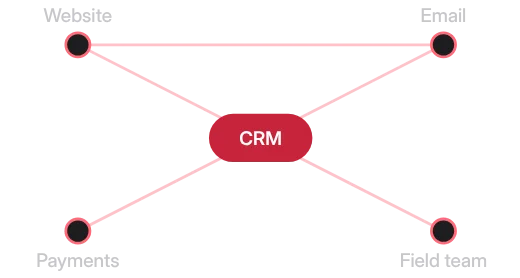
Where does it connect?

The relationships between your tools, users and everyday workflows.

How it connects

SAMPLE

Sample map: the CRM connects to the website, email, payments and the field team; the website also connects to email.

Tools, people and the work between them.

03

What needs attention?

Your concerns, your current setup and the right scope for the conversation.

Questions to bring

SAMPLE

1

Who can change the website?

2

Where do customer records live?

3

What if a key system goes offline?

Your concerns set the scope.

Agree the scope first

One clear picture. Then the right scope.

One clear picture. Then the right scope.

Systems, access and information on one page, so the conversation starts from what your business depends on. Scope is agreed with you.

Systems

Access

Information

Notes

Scope

Scoping brief

Northline Home Services

Draft

Scope agreed

SAMPLE

Systems in view

6

People with access

9

Types of information

6

Questions to bring

6

Proposed scope

Website and hosting

In scope

CRM and customer records

In scope

Staff and vendor access

In scope

Business email

In scope

Online store

Later

Field app

Later

Waiting for your review

Agreed with Dana Brooks, Owner

Illustrative scoping brief with sample data.²

Systems

Access

Information

Notes

Scope

Scoping brief

Northline Home Services

Draft

Scope agreed

SAMPLE

Systems in view

6

People with access

9

Types of information

6

Questions to bring

6

Proposed scope

Website and hosting

In scope

CRM and customer records

In scope

Staff and vendor access

In scope

Business email

In scope

Online store

Later

Field app

Later

Waiting for your review

Agreed with Dana Brooks, Owner

Illustrative scoping brief with sample data.²

The Atlas family

Built to connect. Considered together.

Atlas Blue Systems brings websites, marketing and custom business systems together. Atlas Red Team adds a distinct security focus.

1. This page describes how Atlas Red Team approaches a security conversation. It is not a security assessment, audit or certification. Scope is agreed with each client.

2. Northline Home Services and every person, system and figure shown on this page are fictional sample data. The screens illustrate a scoping conversation.

Powered byAtlas Blue Systems